Fiber Section Mesh
Plain Section
First, we need to create a geometric patch, which will be used to generate the section geometry. The patch can take various shapes, such as polygons or circles. For a polygon patch, we need to provide the vertices. For example, a quadrilateral requires four vertices:
[1]:
import matplotlib.pyplot as plt

import opstool as opst

outlines = [[0, 0], [2, 0], [2, 4], [0, 4]]  # Vertex coordinates
patch = opst.pre.section.create_polygon_patch(outlines)
Then, we pass this into the class opstool.pre.section.FiberSecMesh and call the method to add the patch group and mesh size. Note that the group names should remain consistent.
[2]:
SEC_MESH = opst.pre.section.FiberSecMesh(sec_name="plain section")
SEC_MESH.add_patch_group({"patch1": patch})
SEC_MESH.set_mesh_size({"patch1": 0.2})
SEC_MESH.mesh()  #  mesh the section
SEC_MESH.centring()
OPSTOOL :: The section plain section has been successfully meshed!
Retrieve the properties of a section:
[3]:
sec_props = SEC_MESH.get_frame_props(display_results=True)
                           Frame Section Properties
┏━━━━━━━━━━━┳━━━━━━━━━━━━━━━━━━━━━━━━┳━━━━━━━━━━━━━━━━━━━━━━━━━━━━━━━━━━━━━━━━┓
┃ Symbol    ┃ Value                  ┃ Definition                             ┃
┡━━━━━━━━━━━╇━━━━━━━━━━━━━━━━━━━━━━━━╇━━━━━━━━━━━━━━━━━━━━━━━━━━━━━━━━━━━━━━━━┩
│ A         │ 8.000E+00              │ Cross-sectional area                   │
│ centroid  │ (0.000E+00, 0.000E+00) │ Elastic centroid                       │
│ Iy        │ 1.067E+01              │ Moment of inertia y-axis               │
│ Iz        │ 2.667E+00              │ Moment of inertia z-axis               │
│ Iyz       │ 0.000E+00              │ Product of inertia                     │
│ Wyt       │ 5.333E+00              │ Section moduli of top fibres y-axis    │
│ Wyb       │ 5.333E+00              │ Section moduli of bottom fibres y-axis │
│ Wzt       │ 2.667E+00              │ Section moduli of top fibres z-axis    │
│ Wzb       │ 2.667E+00              │ Section moduli of bottom fibres z-axis │
│ J         │ 7.318E+00              │ Torsion constant                       │
│ phi       │ 0.000E+00              │ Principal axis angle                   │
│ rho_rebar │ 0.000E+00              │ Ratio of reinforcement                 │
└───────────┴────────────────────────┴────────────────────────────────────────┘
[4]:
fig, ax = plt.subplots(figsize=(5, 5))
SEC_MESH.view(fill=False, show_legend=False, ax=ax)
ax.set_aspect("equal", "box")
plt.show()
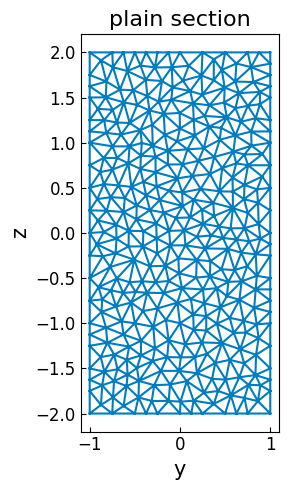
[5]:
SEC_MESH.rotate(30, remesh=True)
SEC_MESH.view(fill=False, show_legend=False, aspect_ratio="equal")
OPSTOOL :: The section plain section has been successfully remeshed!
[5]:
<Axes: title={'center': 'plain section'}, xlabel='y', ylabel='z'>

[6]:
sec_props30 = SEC_MESH.get_sec_props(display_results=True)
                              Section Properties
┏━━━━━━━━━━━┳━━━━━━━━━━━━━━━━━━━━━━━━┳━━━━━━━━━━━━━━━━━━━━━━━━━━━━━━━━━━━━━━━━┓
┃ Symbol    ┃ Value                  ┃ Definition                             ┃
┡━━━━━━━━━━━╇━━━━━━━━━━━━━━━━━━━━━━━━╇━━━━━━━━━━━━━━━━━━━━━━━━━━━━━━━━━━━━━━━━┩
│ A         │ 8.000E+00              │ Cross-sectional area                   │
│ Asy       │ 6.667E+00              │ Shear area y-axis                      │
│ Asz       │ 6.667E+00              │ Shear area z-axis                      │
│ centroid  │ (0.000E+00, 0.000E+00) │ Elastic centroid                       │
│ Iy        │ 8.667E+00              │ Moment of inertia y-axis               │
│ Iz        │ 4.667E+00              │ Moment of inertia z-axis               │
│ Iyz       │ 3.464E+00              │ Product of inertia                     │
│ Wyt       │ 3.883E+00              │ Section moduli of top fibres y-axis    │
│ Wyb       │ 3.883E+00              │ Section moduli of bottom fibres y-axis │
│ Wzt       │ 2.501E+00              │ Section moduli of top fibres z-axis    │
│ Wzb       │ 2.501E+00              │ Section moduli of bottom fibres z-axis │
│ J         │ 7.318E+00              │ Torsion constant                       │
│ phi       │ -3.000E+01             │ Principal axis angle                   │
│ mass      │ 8.000E+00              │ Section mass                           │
│ rho_rebar │ 0.000E+00              │ Ratio of reinforcement                 │
└───────────┴────────────────────────┴────────────────────────────────────────┘
Hollow reinforced concrete (RC) section
[7]:
# Outer contour points
outlines = [[0, 0], [2, 0], [2, 2], [0, 2]]
# After offsetting, we can obtain the inner contour points of the cover layer.
coverlines = opst.pre.section.offset(outlines, d=0.05)
# Create a polygon patch for the outer contour and inner contour of the cover layer
# The cover layer is a polygon with holes
cover_geo = opst.pre.section.create_polygon_patch(outlines, holes=[coverlines])
[8]:
# Create a polygon patch for the core
holelines = [[0.5, 0.5], [1.5, 0.5], [1.5, 1.5], [0.5, 1.5]]
core_geo = opst.pre.section.create_polygon_patch(coverlines, holes=[holelines])
[9]:
SEC_MESH = opst.pre.section.FiberSecMesh()
SEC_MESH.add_patch_group({"cover": cover_geo, "core": core_geo})
SEC_MESH.set_mesh_size({"cover": 0.1, "core": 0.15})
SEC_MESH.set_mesh_color({"cover": "#dbb40c", "core": "#88b378"})
SEC_MESH.mesh()
OPSTOOL :: The section My Section has been successfully meshed!
[10]:
# add rebars to the section
dia = 0.03
rebars_outer = opst.pre.section.offset(coverlines, d=dia / 2)
SEC_MESH.add_rebar_line(points=rebars_outer, dia=dia, n=100, group_name="rebar #30", color="#580f41")

dia = 0.025
rebars_outer = opst.pre.section.offset(holelines, d=-dia / 2 - 0.05)
SEC_MESH.add_rebar_line(points=rebars_outer, dia=dia, gap=0.1, group_name="rebar #25", color="blue")
[11]:
SEC_MESH.centring()
[12]:
_ = SEC_MESH.get_frame_props(display_results=True)
                           Frame Section Properties
┏━━━━━━━━━━━┳━━━━━━━━━━━━━━━━━━━━━━━━┳━━━━━━━━━━━━━━━━━━━━━━━━━━━━━━━━━━━━━━━━┓
┃ Symbol    ┃ Value                  ┃ Definition                             ┃
┡━━━━━━━━━━━╇━━━━━━━━━━━━━━━━━━━━━━━━╇━━━━━━━━━━━━━━━━━━━━━━━━━━━━━━━━━━━━━━━━┩
│ A         │ 3.000E+00              │ Cross-sectional area                   │
│ centroid  │ (0.000E+00, 0.000E+00) │ Elastic centroid                       │
│ Iy        │ 1.250E+00              │ Moment of inertia y-axis               │
│ Iz        │ 1.250E+00              │ Moment of inertia z-axis               │
│ Iyz       │ 8.882E-16              │ Product of inertia                     │
│ Wyt       │ 1.250E+00              │ Section moduli of top fibres y-axis    │
│ Wyb       │ 1.250E+00              │ Section moduli of bottom fibres y-axis │
│ Wzt       │ 1.250E+00              │ Section moduli of top fibres z-axis    │
│ Wzb       │ 1.250E+00              │ Section moduli of bottom fibres z-axis │
│ J         │ 2.068E+00              │ Torsion constant                       │
│ phi       │ 0.000E+00              │ Principal axis angle                   │
│ rho_rebar │ 3.116E-02              │ Ratio of reinforcement                 │
└───────────┴────────────────────────┴────────────────────────────────────────┘
[13]:
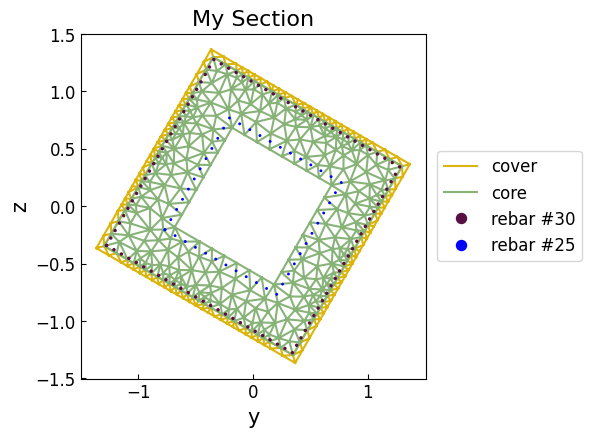
SEC_MESH.view(fill=False, show_legend=True)
plt.show()

[14]:
SEC_MESH.rotate(30, remesh=True)
SEC_MESH.view(fill=False, show_legend=True)
plt.show()
OPSTOOL :: The section My Section has been successfully remeshed!
Coupling with OpenSees
Using section mesh in OpenSeesPy is very straightforward. First, you need to define the materials for each part of the section. For example, the following code defines the materials for the cover, core, and reinforcement:
[15]:
import openseespy.opensees as ops

import opstool as opst

ops.wipe()
ops.model("basic", "-ndm", 3, "-ndf", 6)
coverID, coreID, rebarID = 1, 2, 3
ops.uniaxialMaterial("Concrete01", coverID, -30, -0.002, -15, -0.005)
ops.uniaxialMaterial("Concrete01", coreID, -40, -0.006, -30, -0.015)
ops.uniaxialMaterial("Steel01", rebarID, 200, 2.0e5, 0.02)
As in the example above, define the geometric patch.
[16]:
# Outer contour points
outlines = [[0, 0], [2, 0], [2, 2], [0, 2]]
# After offsetting, we can obtain the inner contour points of the cover layer.
coverlines = opst.pre.section.offset(outlines, d=0.05)
# Create a polygon patch for the outer contour and inner contour of the cover layer
# The cover layer is a polygon with holes
cover_geo = opst.pre.section.create_polygon_patch(outlines, holes=[coverlines])

# Create a polygon patch for the core
holelines = [[0.5, 0.5], [1.5, 0.5], [1.5, 1.5], [0.5, 1.5]]
core_geo = opst.pre.section.create_polygon_patch(coverlines, holes=[holelines])
The only difference is assigning the predefined OpenSees material IDs to each patch by opstool.pre.section.FiberSecMesh.set_ops_mat_tag().
Note that the material ID for reinforcement is defined when adding the rebars.
[17]:
SEC_MESH = opst.pre.section.FiberSecMesh()
SEC_MESH.add_patch_group({"cover": cover_geo, "core": core_geo})
SEC_MESH.set_mesh_size({"cover": 0.1, "core": 0.15})
SEC_MESH.set_mesh_color({"cover": "#dbb40c", "core": "#88b378"})
SEC_MESH.set_ops_mat_tag({"cover": coverID, "core": coreID})  # add opensees mat tag !!!
SEC_MESH.mesh()  # mesh the section

# add rebars to the section
dia = 0.03
rebars_outer = opst.pre.section.offset(coverlines, d=dia / 2)
SEC_MESH.add_rebar_line(
    points=rebars_outer,
    dia=dia,
    n=100,
    ops_mat_tag=rebarID,  # add opensees mat tag
    group_name="rebar #30",
    color="#580f41",
)

dia = 0.025
rebars_outer = opst.pre.section.offset(holelines, d=-dia / 2 - 0.05)
SEC_MESH.add_rebar_line(
    points=rebars_outer,
    dia=dia,
    gap=0.1,
    ops_mat_tag=rebarID,  # add opensees mat tag !!!
    group_name="rebar #25",
    color="blue",
)
OPSTOOL :: The section My Section has been successfully meshed!
To retrieve the torsional stiffness:
[18]:
G = 10000  # shear modulus of the concrete
J = SEC_MESH.get_j()  # get the torsional constant
GJ = G * J
GJ
[18]:
20682.549805756353
We can directly create OpenSees fiber sections at runtime, where fibers are essentially defined one by one using the fiber command (with coordinates and areas obtained from triangular meshes):
[19]:
SEC_MESH.centring()

sec_tag = 1
SEC_MESH.to_opspy_cmds(secTag=sec_tag, GJ=GJ)  # to the opensees commands
The section is now ready to be used elsewhere. For example, we can create the following zero-length element:
[20]:
ops.node(1, 0, 0, 0)
ops.node(2, 0, 0, 0)

sec_tag = 1
ops.element("zeroLengthSection", sec_tag, 1, 2, sec_tag)
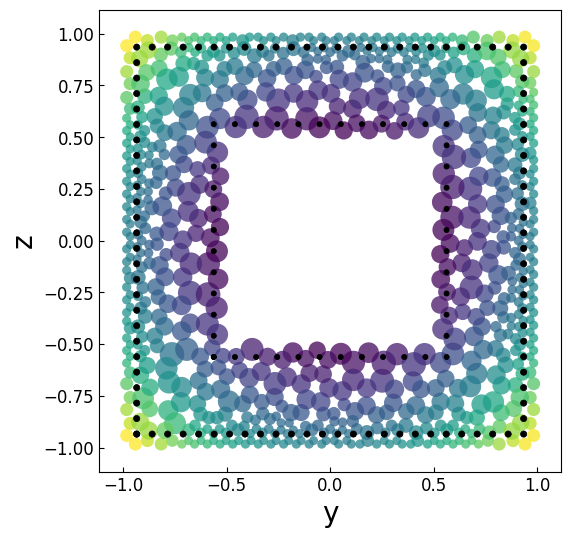
We can visualize the fiber section in the OpenSeesPy domain to inspect it. Here’s an example of how to do it:
Note
opstool.pre.section.vis_fiber_sec_real() visualizes the actual appearance of the fiber section used in the analysis. In practice, only the coordinates and areas of the fiber points are necessary.
[21]:
opst.pre.section.vis_fiber_sec_real(ele_tag=sec_tag, highlight_matTag=rebarID, highlight_color="k")
plt.show()
If you want to save it to a file you can do this:
[22]:
SEC_MESH.to_file("my_section.py", secTag=1, GJ=GJ, fmt=":.6E")

# SEC_MESH.to_file("my_section.tcl", secTag=1, GJ=GJ, fmt=":.6E")
OPSTOOL :: The file my_section.py has been successfully written!