Fiber Section Mesh
Section mesh class
This is a main class for creating fiber section triangular mesh.
|
A class to mesh the cross-section with triangular fibers. |
alias of |
Utility functions for creating geometry and materials
|
Create a meterial object of sectionproperties material. |
Add a polygon plane geom object. |
|
Add the circle geom obj. |
|
An interface for the creation of Geometry objects from CAD .dxf files. |
|
Create a polygon points. |
|
Add the circle geom obj. |
|
|
Offsets closed polygons. |
|
Offset a distance from a non-closed line ring on its right or its left side. |
|
Offsets closed polygons, same as |
Assign material to a geom patch. |
|
Visualizing the actual fiber section data, where only the fiber center coordinates and areas are demonstrated, represents the data used in analysis. |
Wrapper for OpenSeesPy section commands
The following commands wrap the fiber section-related commands in OpenSeesPy.
These commands retain the same functionality as the original commands but additionally save
the user-provided input data for purposes such as visualization.
|
|
|
|
|
|
|
|
Plot the fiber section by section tag. |
Example
import numpy as np
import openseespy.opensees as ops
import opstool as opst

ops.wipe()
ops.model("basic", "-ndm", 3, "-ndf", 6)
ops.uniaxialMaterial("Elastic", 1, 1000)
The following commands, like those in OpenSeesPy, create objects in the domain.
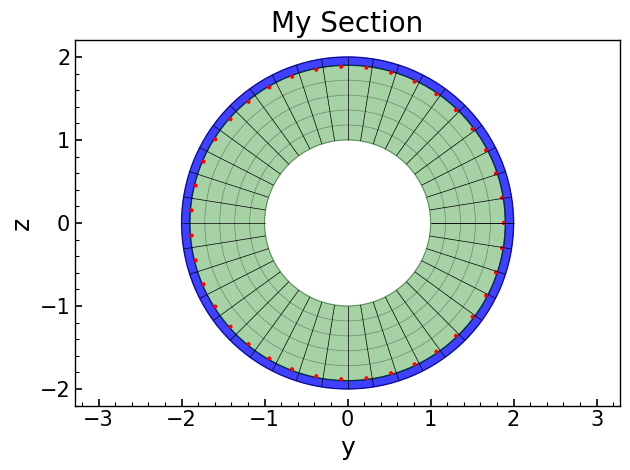
sectag = 1
opst.pre.section.section("Fiber", sectag, "-GJ", 1.0e6)
opst.pre.section.patch("circ", 1, 40, 1, 0, 0, 1.9, 2, 0, 360, color="blue", opacity=0.75)
opst.pre.section.patch("circ", 1, 40, 5, 0, 0, 1, 1.9, 0, 360, color="green", opacity=0.35)
opst.pre.section.layer("circ", 1, 40, np.pi * 0.016**2, 0, 0, 1.9 - 0.016, 0.0, 360.0, color="red")
# plot
opst.pre.section.plot_fiber_sec_cmds(sec_tag=1)
Let’s look at another example.
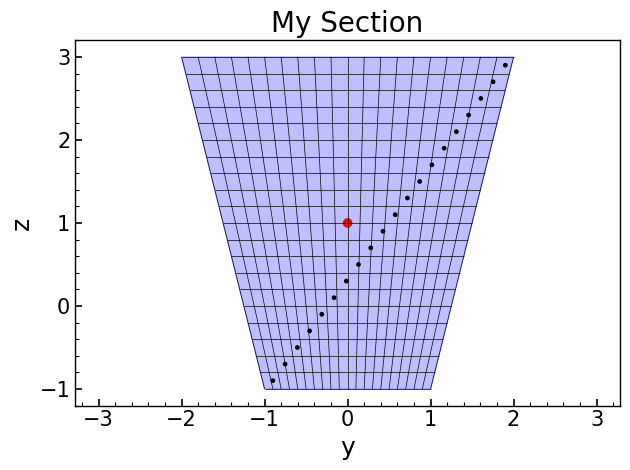
sectag = 2
opst.pre.section.section("Fiber", sectag, "-GJ", 1.0e6)
opst.pre.section.patch("quad", 1, 20, 20, -1, -1, 1, -1, 2, 3, -2, 3, color="blue", opacity=0.25)
opst.pre.section.layer(
    "straight", 1, 20, np.pi * 0.02**2, *[-0.9, -0.9], *[1.9, 2.9], color="black"
)
opst.pre.section.fiber(0, 1, np.pi * 0.05**2, 1, color="red")
# plot
opst.pre.section.plot_fiber_sec_cmds(sec_tag=2)