Model mass generation
Tip
Since v1.0.15, opstool provides two functions, opstool.pre.get_node_mass() and opstool.pre.create_gravity_load(), to automatically extract all the mass in the model and create gravity loads. Therefore, you can freely use mass, mass density in ndmaterial and elements, et al., to apply mass when modeling. Therefore, the examples in this document are no longer recommended.
For more details, see Get Model Mass
This page demonstrates how to manage model mass using opstool.pre.ModelMass().
[ ]:
import openseespy.opensees as ops

import opstool as opst
Line and area elements
First create several beam elements and a shell element:
[2]:
ops.wipe()
ops.model("basic", "-ndm", 3, "-ndf", 6)
ops.node(1, 0, 0, 0)
ops.node(2, 0, 0, 1)
ops.node(3, 2, 0, 1)
ops.node(4, 2, 0, 0)
ops.node(5, 0, 0, 2)
ops.node(6, 2, 0, 2)

ops.fix(1, 1, 1, 1, 1, 1, 1)
ops.fix(4, 1, 1, 1, 1, 1, 1)

ops.geomTransf("Linear", 1, -1, 0, 0)
beam_area = 1
ops.element("elasticBeamColumn", 1, *[1, 2], beam_area, 1, 1, 1, 1, 1, 1)
ops.element("elasticBeamColumn", 2, *[4, 3], beam_area, 1, 1, 1, 1, 1, 1)

ops.nDMaterial("ElasticIsotropic", 1, 1000.0, 0.2)
ops.section("LayeredShell", 11, 4, 1, 0.025, 1, 0.025, 1, 0.025, 1, 0.025)

# create the shell element using the small displacements/rotations assumption
ops.element("ASDShellQ4", 3, *[2, 3, 6, 5], 11)
Using ASDShellQ4 - Developed by: Massimo Petracca, Guido Camata, ASDEA Software Technology
[3]:
opst.vis.pyvista.set_plot_props(notebook=True, point_size=8)
opst.vis.pyvista.plot_model().show(jupyter_backend="jupyterlab")
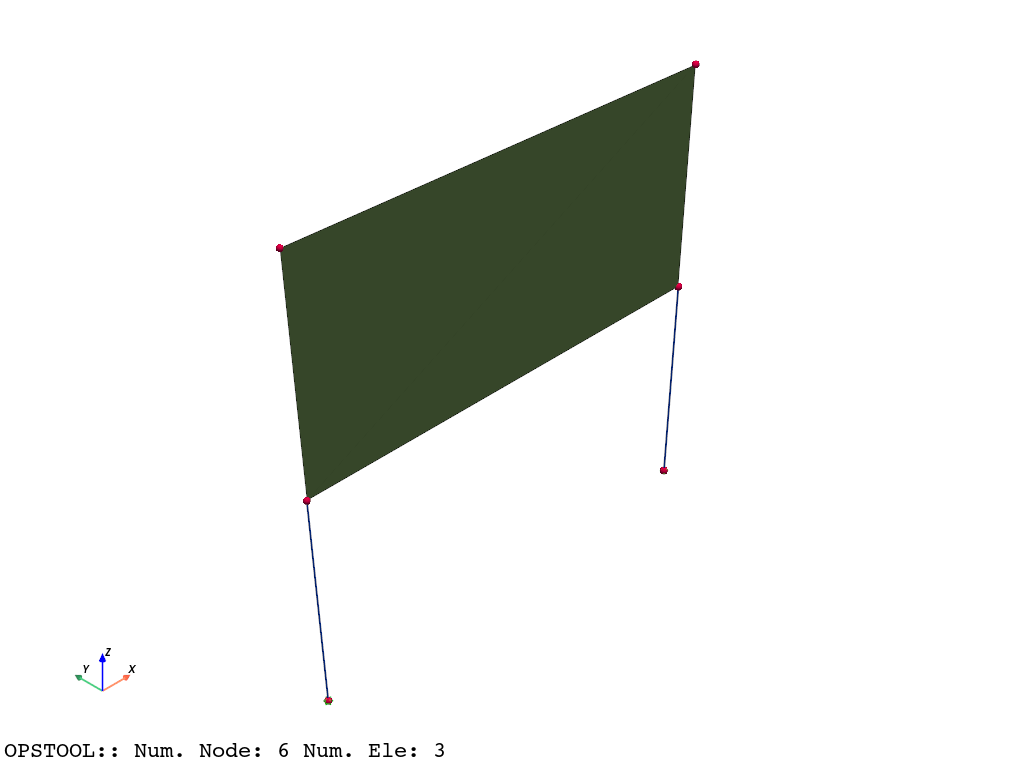
Creating masses for these elements is quite simple: you only need to provide the mass density and the cross-sectional area for beam elements or the thickness for shell elements. The system will automatically calculate the volume of beam elements and distribute the mass evenly across the nodes.
[4]:
MODEL_MASS = opst.pre.ModelMass()
MODEL_MASS.add_mass_from_line(ele_tags=[1, 2], rho=1, area=1)
MODEL_MASS.add_mass_from_surf(ele_tags=[3], rho=1, d=0.1)
nodel_mass = MODEL_MASS.get_node_mass()
nodel_mass
[4]:
{1: 0.5, 2: 0.55, 4: 0.5, 3: 0.55, 6: 0.05, 5: 0.05}
We can verify the correctness of these results. For example:
Beam: 1×1×1=1
Shell: 1×2×0.1=0.2
Thus, the mass distributed to each node is as follows:
Node 1: 1 / 2 = 0.5
Node 2: 0.5+0.2/4=0.55
Node 3: 0.55
Node 4: 0.5
Node 5: 0.05
Node 6: 0.05
Generate OpenSeesPy Node Mass Commands
[5]:
MODEL_MASS.generate_ops_node_mass()
Automatically Generate Gravity Loads:
[6]:
ops.timeSeries("Linear", 1)
ops.pattern("Plain", 1, 1)
MODEL_MASS.generate_ops_gravity_load(direction="Z", factor=-9.81)
Solid element
[7]:
ops.wipe()
ops.model("basic", "-ndm", 3, "-ndf", 3)
ops.nDMaterial("ElasticIsotropic", 1, 1000.0, 0.2)

ops.node(1, 0, 0, 0)
ops.node(2, 1, 0, 0)
ops.node(3, 1, 1, 0)
ops.node(4, 0, 1, 0)
ops.node(5, 0, 0, 1)
ops.node(6, 1, 0, 1)
ops.node(7, 1, 1, 1)
ops.node(8, 0, 1, 1)

ops.element("stdBrick", 1, *[1, 2, 3, 4, 5, 6, 7, 8], 1)
[8]:
opst.vis.pyvista.set_plot_props(notebook=True, point_size=8)
opst.vis.pyvista.plot_model().show(jupyter_backend="jupyterlab")

[9]:
MODEL_MASS = opst.pre.ModelMass()
MODEL_MASS.add_mass_from_brick(ele_tags=[1], rho=1)
nodel_mass = MODEL_MASS.get_node_mass()
nodel_mass
[9]:
{1: 0.125,
 2: 0.125,
 3: 0.125,
 4: 0.125,
 5: 0.125,
 6: 0.125,
 7: 0.125,
 8: 0.125}
Exactly, consistent with our expected 1/8.
Tip
In practice, using a loop is more convenient.