Excavation Supported by Cantilevered Sheet Pile Wall
This example is from file Excavation Supported by Cantilevered Sheet Pile Wall on the OpenSees website and has been converted using opst.pre.tcl2py.
The python model script can be found here excavation.py.
[1]:
import openseespy.opensees as ops
import opstool as opst

OPSVIS = opst.vis.pyvista
Load the FEM model function FEMmodel from file excavation.py.
[2]:
from excavation import FEMmodel

FEMmodel()
InitialStateAnalysisWrapper nDmaterial - Written: C.McGann, P.Arduino, P.Mackenzie-Helnwein, U.Washington
ContactMaterial2D nDmaterial - Written: K.Petek, P.Mackenzie-Helnwein, P.Arduino, U.Washington
BeamContact2D element - Written: C.McGann, P.Arduino, P.Mackenzie-Helnwein, U.Washington
[3]:
OPSVIS.set_plot_props(point_size=1, font_size=9, notebook=True)
OPSVIS.plot_model(show_node_numbering=True,
                  show_ele_numbering=True).show(jupyter_backend='jupyterlab')
OPSTOOL :: Model data has been saved to _OPSTOOL_ODB/ModelData-None.nc!
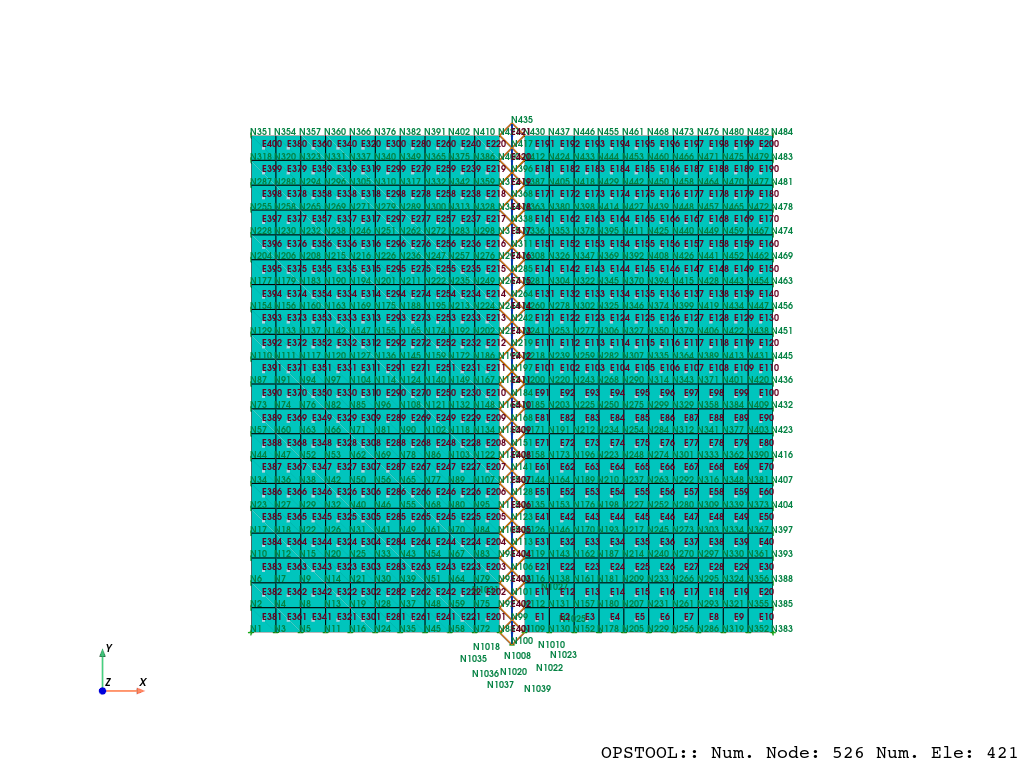
Create output database (ODB) file. Since some elements and nodes will be removed in subsequent analyses, ensure that model_update=True.
[4]:
ODB = opst.post.CreateODB(odb_tag=1, model_update=True)
GRAVITY ANALYSIS (w/ INITIAL STATE ANALYSIS TO RESET DISPLACEMENTS)
[5]:
# define analysis parameters for gravity phase
ops.constraints("Transformation")
ops.test("NormDispIncr", 1e-05, 50, 0)
ops.algorithm("Newton")
ops.numberer("RCM")
ops.system("SparseGeneral")
ops.integrator("LoadControl", 1)
ops.analysis("Static")
Perform an initial state analysis, where elements with tags 1001–1042 are BeamContact2D.
[6]:
# turn on initial state analysis feature
ops.InitialStateAnalysis("on")
# ensure soil material intially considers linear elastic behavior
ops.updateMaterialStage("-material", 1, "-stage", 0)
# set contact elements to be frictionless for gravity analysis
ops.setParameter("-val", 0, "-eleRange", 1001, 1042, "friction")
# analysis 4 steps, and fetch response
for _ in range(4):
    ops.analyze(1)
    ODB.fetch_response_step()
InitialStateAnalysis ON
Update soil material to consider elastoplastic behavior and analyze a few more steps:
[7]:
# update soil material to consider elastoplastic behavior and analyze a few more steps
ops.updateMaterialStage("-material", 1, "-stage", 1)
# analysis 4 steps, and fetch response
for _ in range(4):
    ops.analyze(1)
    ODB.fetch_response_step()
# designate end of initial state analysis (zeros displacements, keeps state variables)
ops.InitialStateAnalysis("off")
# turn on frictional behavior for beam contact elements
ops.setParameter("-val", 1, "-eleRange", 1001, 1042, "friction")
InitialStateAnalysis OFF
Domain::addParameter - parameter with tag 0 already exists in model
REMOVE ELEMENTS TO SIMULATE EXCAVATION
[8]:
# define analysis parameters for excavation phase
ops.wipeAnalysis()
ops.constraints("Transformation")
ops.test("NormDispIncr", 0.0001, 60)
ops.algorithm("KrylovNewton")
ops.numberer("RCM")
ops.system("SparseGeneral")
ops.integrator("LoadControl", 1)
ops.analysis("Static")
We first define a function to avoid repetitive removal of elements and nodes, and then proceed with several steps of analysis.
[9]:
def remove_components(ele_tags, node_tags, nsteps=4):
    for etag in ele_tags:
        ops.remove("element", etag)
    for ntag in node_tags:
        ops.remove("node", ntag)
    # run analysis after object removal
    for _ in range(nsteps):
        ops.analyze(1)
        ODB.fetch_response_step()
Remove objects associated with lift 1:
[10]:
# remove objects associated with lift 1
# soil elements
ele_tags = [191, 192, 193, 194, 195, 196, 197, 198, 199, 200]
ele_tags += [1042]  # contact element
# soil nodes
node_tags = [430, 437, 446, 455, 461, 468, 473, 476, 480, 482, 484]
node_tags += [1042]  # lagrange multiplier node

remove_components(ele_tags, node_tags, nsteps=4)

print("Lift 1 removed")
Lift 1 removed
We can then remove the remaining 9 lifts:
[11]:
# remove objects associated with lift 2
# soil elements
ele_tags = [181, 182, 183, 184, 185, 186, 187, 188, 189, 190]
ele_tags += [1040]  # contact element
# soil nodes
node_tags = [412, 424, 433, 444, 453, 460, 466, 471, 475, 479, 483]
node_tags += [1040]  # lagrange multiplier node

remove_components(ele_tags, node_tags, nsteps=4)

print("Lift 2 removed")
Lift 2 removed
[12]:
# remove objects associated with lift 3
# soil elements
ele_tags = [171, 172, 173, 174, 175, 176, 177, 178, 179, 180]
ele_tags += [1038]  # contact element
# soil nodes
node_tags = [387, 405, 418, 429, 442, 450, 458, 464, 470, 477, 481]
node_tags += [1038]  # lagrange multiplier node

remove_components(ele_tags, node_tags, nsteps=4)

print("Lift 3 removed")
Lift 3 removed
[13]:
# remove objects associated with lift 4
# soil elements
ele_tags = [161, 162, 163, 164, 165, 166, 167, 168, 169, 170]
ele_tags += [1036]  # contact element
# soil nodes
node_tags = [363, 380, 398, 414, 427, 439, 448, 457, 465, 472, 478]
node_tags += [1036]  # lagrange multiplier node

remove_components(ele_tags, node_tags, nsteps=4)

print("Lift 4 removed")
Lift 4 removed
[14]:
# remove objects associated with lift 5
# soil elements
ele_tags = [151, 152, 153, 154, 155, 156, 157, 158, 159, 160]
ele_tags += [1034]  # contact element
# soil nodes
node_tags = [336, 353, 378, 395, 411, 425, 440, 449, 459, 467, 474]
node_tags += [1034]  # lagrange multiplier node

remove_components(ele_tags, node_tags, nsteps=4)

print("Lift 5 removed")
Lift 5 removed
[15]:
# remove objects associated with lift 6
# soil elements
ele_tags = [141, 142, 143, 144, 145, 146, 147, 148, 149, 150]
ele_tags += [1032]  # contact element
# soil nodes
node_tags = [308, 326, 347, 369, 392, 408, 426, 441, 452, 462, 469]
node_tags += [1032]  # lagrange multiplier node

remove_components(ele_tags, node_tags, nsteps=4)

print("Lift 6 removed")
Lift 6 removed
[16]:
# remove objects associated with lift 7
# soil elements
ele_tags = [131, 132, 133, 134, 135, 136, 137, 138, 139, 140]
ele_tags += [1030]  # contact element
# soil nodes
node_tags = [281, 304, 322, 345, 370, 394, 415, 428, 443, 454, 463]
node_tags += [1030]  # lagrange multiplier node

remove_components(ele_tags, node_tags, nsteps=4)

print("Lift 7 removed")
Lift 7 removed
[17]:
# remove objects associated with lift 8
# soil elements
ele_tags = [121, 122, 123, 124, 125, 126, 127, 128, 129, 130]
ele_tags += [1028]  # contact element
# soil nodes
node_tags = [260, 278, 302, 325, 346, 374, 399, 419, 434, 447, 456]
node_tags += [1028]  # lagrange multiplier node

remove_components(ele_tags, node_tags, nsteps=4)

print("Lift 8 removed")
Lift 8 removed
[18]:
# remove objects associated with lift 9
# soil elements
ele_tags = [111, 112, 113, 114, 115, 116, 117, 118, 119, 120]
ele_tags += [1026]  # contact element
# soil nodes
node_tags = [241, 253, 277, 306, 327, 350, 379, 406, 422, 438, 451]
node_tags += [1026]  # lagrange multiplier node

remove_components(ele_tags, node_tags, nsteps=4)

print("Lift 9 removed")
Lift 9 removed
[19]:
# remove objects associated with lift 10
# soil elements
ele_tags = [101, 102, 103, 104, 105, 106, 107, 108, 109, 110]
ele_tags += [1024]  # contact element
# soil nodes
node_tags = [218, 239, 259, 282, 307, 335, 364, 389, 413, 431, 445]
node_tags += [1024]  # lagrange multiplier node

remove_components(ele_tags, node_tags, nsteps=4)

print("Lift 10 removed")
Lift 10 removed
We can save all previous responses to a file:
[20]:
ODB.save_response()
OPSTOOL :: All responses data with odb_tag = 1 saved in _OPSTOOL_ODB/RespStepData-1.nc!
Post-processing
[21]:
import matplotlib.pyplot as plt
import opstool as opst
import opstool.vis.pyvista as opsvis
Since the result data has already been saved, we can read it at any time for post-processing:
[22]:
opsvis.set_plot_props(point_size=0,
                      line_width=5,
                      cmap="turbo",
                      title_font_size=12,
                      notebook=True)
nodal responses
[23]:
opsvis.plot_nodal_responses(
    odb_tag=1,
    slides=True,
    scale=2,
    resp_type="disp",
    resp_dof=["UX", "UY"],
).show(jupyter_backend="juoyterlab")
OPSTOOL :: Loading response data from _OPSTOOL_ODB/RespStepData-1.nc ...
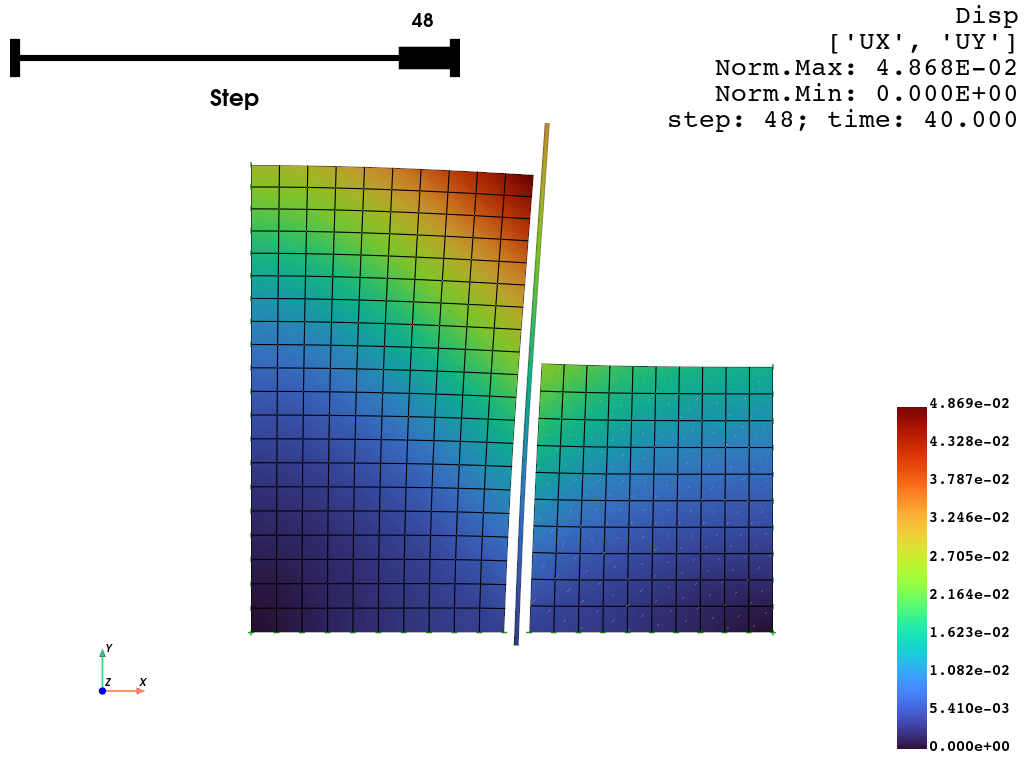
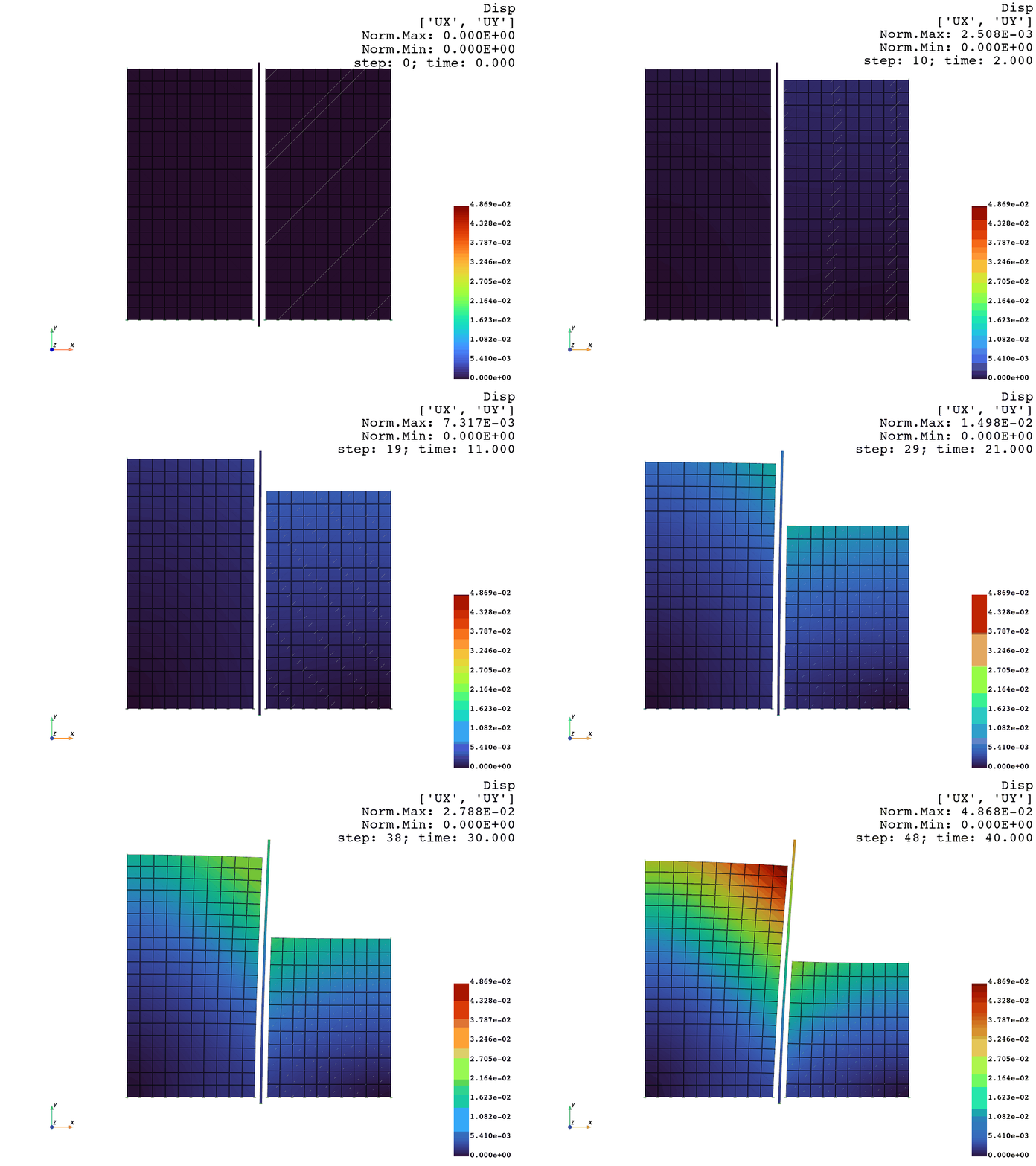
We can create animations:
[24]:
opsvis.plot_nodal_responses_animation(
    odb_tag=1,
    framerate=20,
    scale=2,
    savefig="NodalRespAnimation.gif",
    resp_type="disp",
    resp_dof=["UX", "UY"],
).close()
OPSTOOL :: Loading response data from _OPSTOOL_ODB/RespStepData-1.nc ...
Animation saved to NodalRespAnimation.gif!
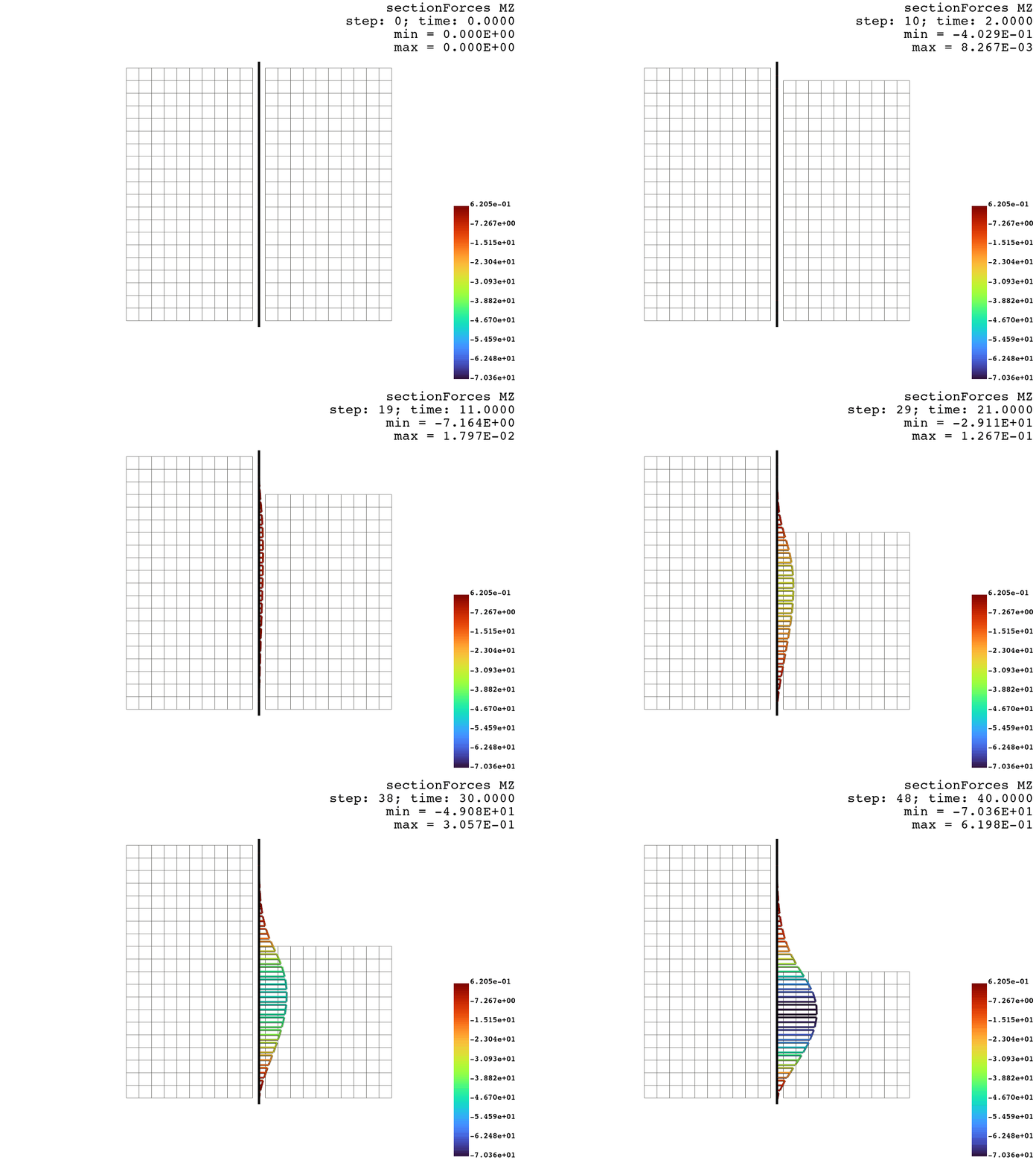
Frame elements responses
[25]:
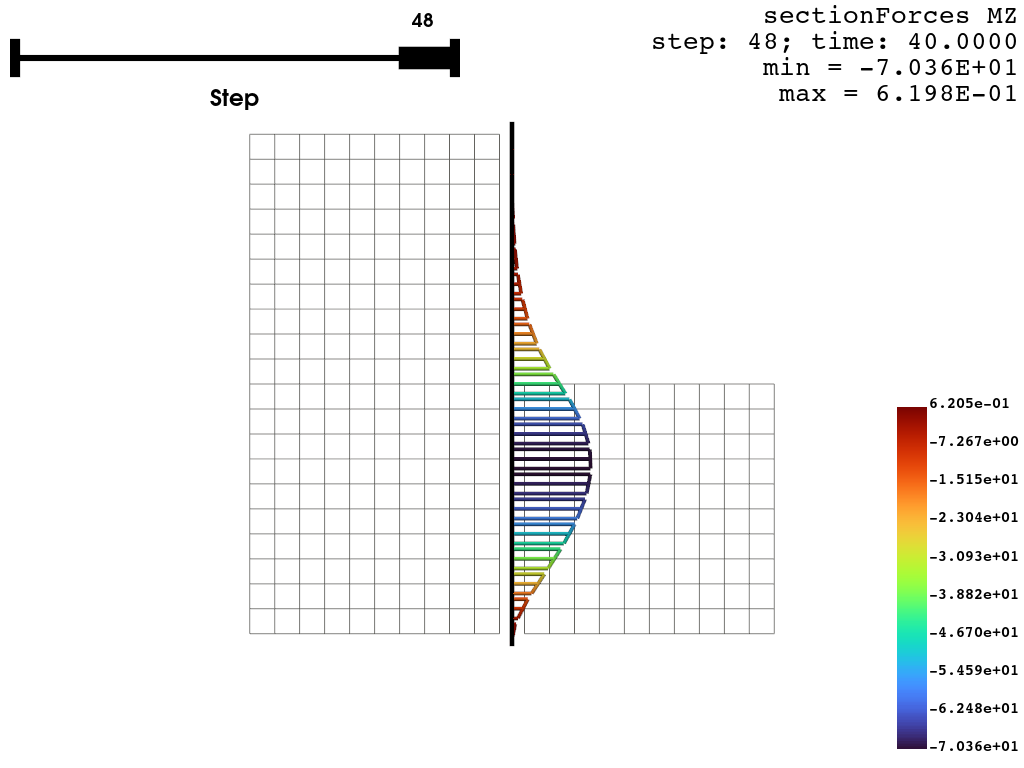
opsvis.plot_frame_responses(
    odb_tag=1,
    resp_type="sectionForces",
    resp_dof="MZ",
    scale=3,
    slides=True,
    line_width=4,
).show(jupyter_backend="juoyterlab")
OPSTOOL :: Loading response data from _OPSTOOL_ODB/RespStepData-1.nc ...
[26]:
opsvis.plot_frame_responses_animation(odb_tag=1,
                                      resp_type="sectionForces",
                                      resp_dof="MZ",
                                      framerate=20,
                                      scale=3,
                                      line_width=4,
                                      savefig="FrameForcesMZ.gif").close()
OPSTOOL :: Loading response data from _OPSTOOL_ODB/RespStepData-1.nc ...
Animation saved as FrameForcesMZ.gif!
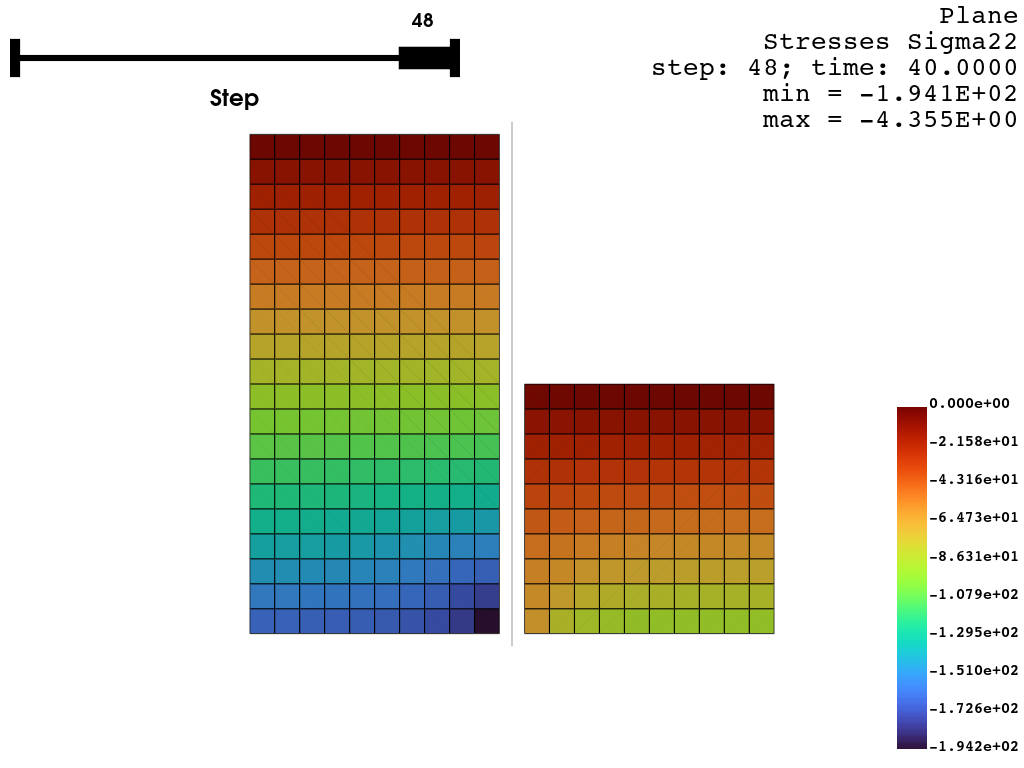
Plane elements response
[27]:
opsvis.plot_unstruct_responses(
    odb_tag=1,
    slides=True,
    ele_type="Plane",
    resp_type="Stresses",
    resp_dof="sigma22").show(jupyter_backend="jupyterlab")
OPSTOOL :: Loading response data from _OPSTOOL_ODB/RespStepData-1.nc ...
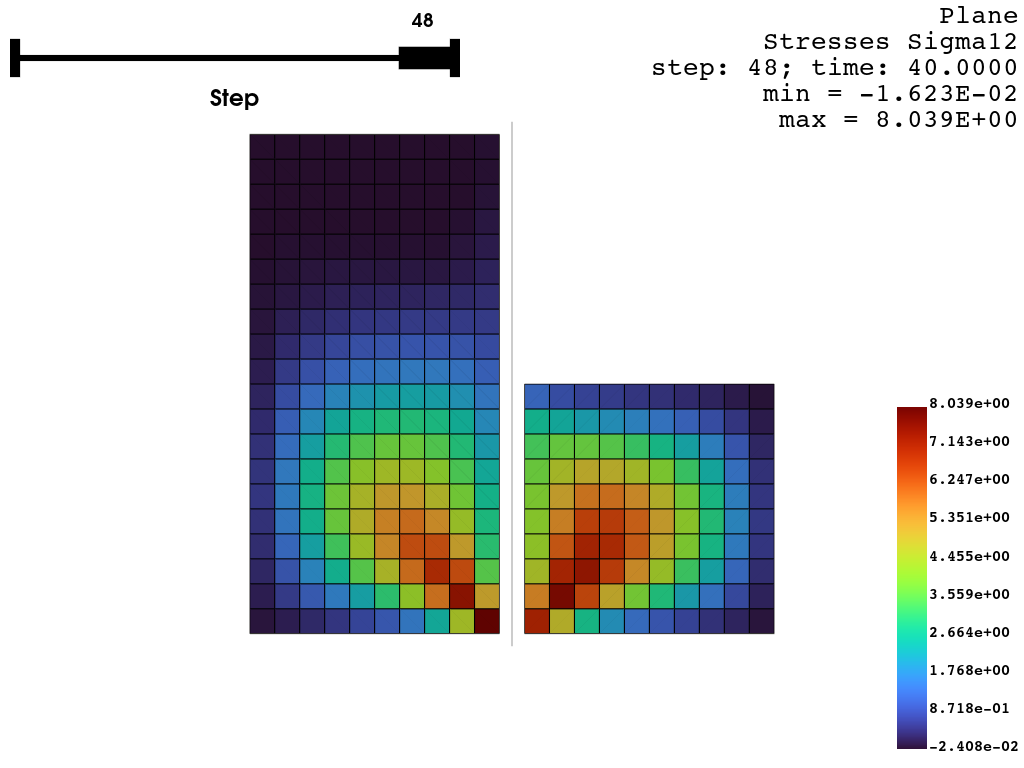
[28]:
opsvis.plot_unstruct_responses(
    odb_tag=1,
    slides=True,
    ele_type="Plane",
    resp_type="Stresses",
    resp_dof="sigma12").show(jupyter_backend="jupyterlab")
OPSTOOL :: Loading response data from _OPSTOOL_ODB/RespStepData-1.nc ...
Read data from ODB
Reading the response of the contact element
[29]:
data = opst.post.get_element_responses(odb_tag=1, ele_type="Contact")
OPSTOOL :: Loading Contact None response data from _OPSTOOL_ODB/RespStepData-1.nc ...
[30]:
print(data)
<xarray.Dataset> Size: 182kB
Dimensions:       (time: 49, eleTags: 42, globalDOFs: 3, localDOFs: 3,
                   slipDOFs: 2)
Coordinates:
  * eleTags       (eleTags) int32 168B 1001 1002 1003 1004 ... 1040 1041 1042
  * globalDOFs    (globalDOFs) <U2 24B 'Px' 'Py' 'Pz'
  * localDOFs     (localDOFs) <U2 24B 'N' 'Tx' 'Ty'
  * slipDOFs      (slipDOFs) <U2 16B 'Tx' 'Ty'
  * time          (time) float64 392B 0.0 1.0 2.0 3.0 ... 37.0 38.0 39.0 40.0
Data variables:
    globalForces  (time, eleTags, globalDOFs) float64 49kB ...
    localForces   (time, eleTags, localDOFs) float64 49kB ...
    localDisp     (time, eleTags, localDOFs) float64 49kB ...
    slips         (time, eleTags, slipDOFs) float64 33kB ...
Attributes:
    Px:       Global force in the x-direction on the constrained node
    Py:       Global force in the y-direction on the constrained node
    Pz:       Global force in the z-direction on the constrained node
    N:        Normal force or deformation
    Tx:       Tangential force or deformation in the x-direction
    Ty:       Tangential force or deformation in the y-direction
[31]:
data["localForces"].sel(eleTags=1001).plot.line(x="time")
plt.show()
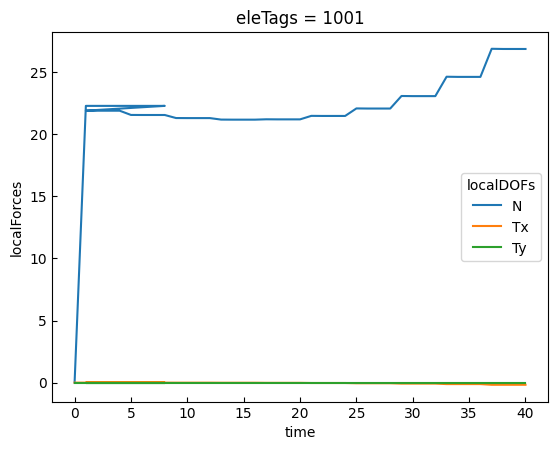
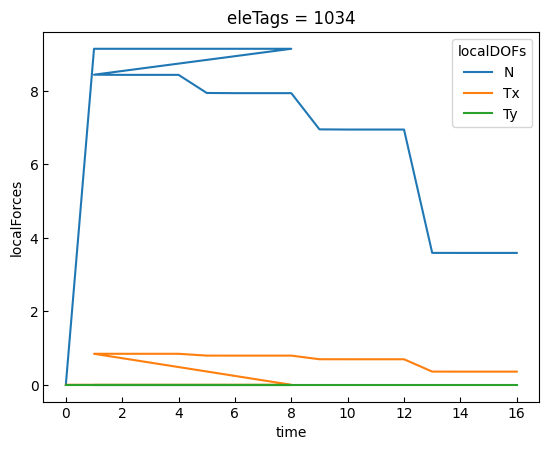
Let’s examine the response of contact element #1034. Since it is removed during the fifth lift, its response is truncated at time=16, and subsequent data will be filled with numpy.nan.
[32]:
data["localForces"].sel(eleTags=1034).plot.line(x="time")
plt.show()
[33]:
data["localForces"].sel(eleTags=1034).data
[33]:
array([[ 0.00000000e+00,  0.00000000e+00,  0.00000000e+00],
       [ 9.13956784e+00,  0.00000000e+00,  0.00000000e+00],
       [ 9.13956784e+00, -2.08336067e-16,  0.00000000e+00],
       [ 9.13956784e+00, -2.17778107e-16,  0.00000000e+00],
       [ 9.13956784e+00, -2.06300179e-16,  0.00000000e+00],
       [ 9.13956784e+00, -1.53844485e-16,  0.00000000e+00],
       [ 9.13956784e+00, -1.78700356e-16,  0.00000000e+00],
       [ 9.13956784e+00, -2.17106727e-16,  0.00000000e+00],
       [ 9.13956784e+00, -2.71420173e-16,  0.00000000e+00],
       [ 8.43453662e+00,  8.43453662e-01,  0.00000000e+00],
       [ 8.43020451e+00,  8.43020451e-01,  0.00000000e+00],
       [ 8.43020584e+00,  8.43020584e-01,  0.00000000e+00],
       [ 8.43020579e+00,  8.43020579e-01,  0.00000000e+00],
       [ 7.93766965e+00,  7.93766965e-01,  0.00000000e+00],
       [ 7.93277336e+00,  7.93277336e-01,  0.00000000e+00],
       [ 7.93278068e+00,  7.93278068e-01,  0.00000000e+00],
       [ 7.93278339e+00,  7.93278339e-01,  0.00000000e+00],
       [ 6.94737433e+00,  6.94737433e-01,  0.00000000e+00],
       [ 6.94260589e+00,  6.94033675e-01,  0.00000000e+00],
       [ 6.94260910e+00,  6.94038289e-01,  0.00000000e+00],
       [ 6.94261119e+00,  6.94038434e-01,  0.00000000e+00],
       [ 3.58766228e+00,  3.58766228e-01,  0.00000000e+00],
       [ 3.58697002e+00,  3.57829743e-01,  0.00000000e+00],
       [ 3.58696846e+00,  3.57835052e-01,  0.00000000e+00],
       [ 3.58697058e+00,  3.57835182e-01,  0.00000000e+00],
       [            nan,             nan,             nan],
       [            nan,             nan,             nan],
       [            nan,             nan,             nan],
       [            nan,             nan,             nan],
       [            nan,             nan,             nan],
       [            nan,             nan,             nan],
       [            nan,             nan,             nan],
       [            nan,             nan,             nan],
       [            nan,             nan,             nan],
       [            nan,             nan,             nan],
       [            nan,             nan,             nan],
       [            nan,             nan,             nan],
       [            nan,             nan,             nan],
       [            nan,             nan,             nan],
       [            nan,             nan,             nan],
       [            nan,             nan,             nan],
       [            nan,             nan,             nan],
       [            nan,             nan,             nan],
       [            nan,             nan,             nan],
       [            nan,             nan,             nan],
       [            nan,             nan,             nan],
       [            nan,             nan,             nan],
       [            nan,             nan,             nan],
       [            nan,             nan,             nan]])