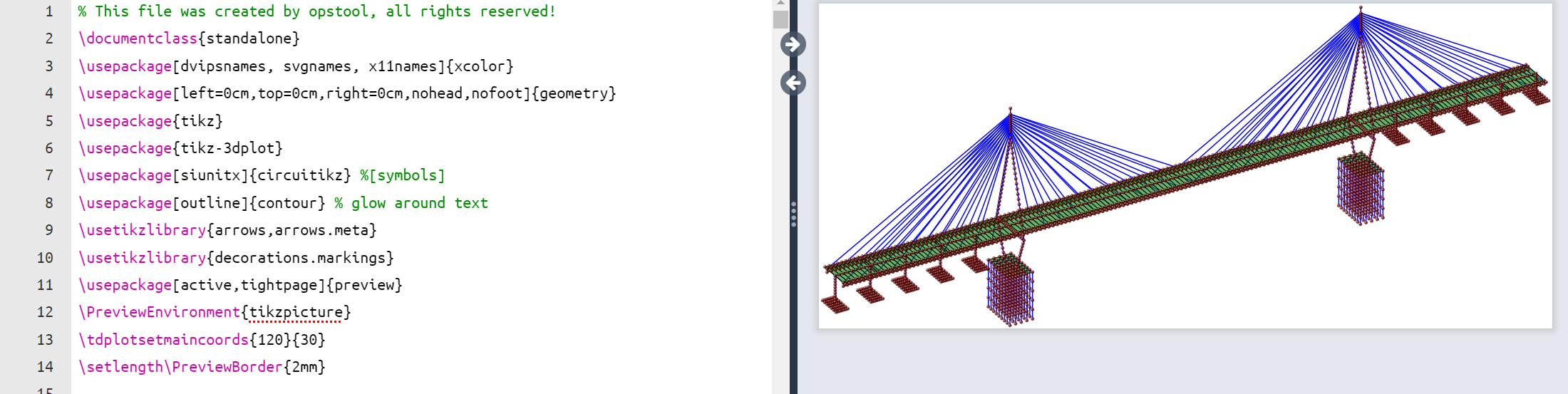
Output model data as tikz code in latex#
- opstool.vis.save_tikz(input_file, output_file='ModelData.tex', point_size=5, line_width=3, face_opacity=0.6, solid_opacity=0.6, point_opacity=0.8, line_opacity=1.0, show_beam_sec=False, beam_sec_paras=None, color_dict=None)[source]#
Save the
OpenSeesPymodel data as atikzcommand file inlatex, and then you can open it in your local tex editor, or run it online inoverleaf.Parameters#
- input_filestr
The input model data file, e.g., “opstool_output/ModelData.hdf5”.
- output_filestr, optional
The output tex file contains the tikz commands, by default “ModelData.tex”
- point_sizefloat, optional
The point size in
ptunit, by default 5- line_widthfloat, optional
The line width in
ptunit, by default 3- face_opacityfloat, optional
The opacity of face elements, by default 0.75
- solid_opacityfloat, optional
The opacity of solid elements, by default 0.75
- point_opacityfloat, optional
The opacity of point, by default 0.75
- line_opacityfloat, optional
The opacity of line elements, by default 1.0
- show_beam_sec: bool default = False
Whether to render the 3d section of beam or truss elements. If True, the Arg beam_sec in
opstool.vis.GetFEMdata.get_model_data()must be assigned in advance.- beam_sec_paras: dict defalut = None,
A dict to control beam section render, optional key: color, opacity.
- color_dictdict, optional
The color of each type of element, by default None. The valid color string must be one of the
xcolorpackage. If None, color_dict = dict(point=”Maroon”, line=”Blue”, face=”Green”, solid=”Violet”, truss=”pink”, link=”SkyBlue”, constraint=”Lime”)
Example#
import openseespy.opensees as ops
import opstool as opst

# opst.load_ops_examples("ArchBridge")
opst.load_ops_examples("CableStayedBridge")
# opst.load_ops_examples("Dam")
# opst.load_ops_examples("Frame3D")
# opst.load_ops_examples("Igloo")
# opst.load_ops_examples("Pier")
# opst.load_ops_examples("SuspensionBridge")

# ------------------------
# or your model code here
# ------------------------

ModelData = opst.GetFEMdata(results_dir="opstool_output")
ModelData.get_model_data(save_file="ModelData.hdf5")

opst.save_tikz("opstool_output/ModelData.hdf5", "ModelData.tex")
You can open and compile the generated file ModelData.tex in overleaf